
How we implemented Storyblok A/B testing for Gravitee with Astro, Netlify and GA4

We first heard about Storyblok's plans for native A/B testing at JoyConf 2025, and it was one of the features we were most excited to try. The idea of giving content editors the ability to create different versions of a page, test them against each other and see what's working, all within Storyblok, was something we could see real value in.
When Storyblok's native A/B testing feature launched on 1 June 2026 as part of Storyblok Labs, available to Premium and Elite customers, we were keen to put it to use. We had a great opportunity to do that with Gravitee, whose website we'd built using Storyblok, Astro and Netlify.
There was a bit more to it than simply switching the feature on, though.
First things first, it's not a one-click solution
One thing worth understanding about Storyblok's A/B testing feature is that it isn't a ready-to-go solution where you enable a setting and immediately start testing pages.
Storyblok is a headless CMS. It manages your content, but your website is responsible for displaying it. The same applies to A/B testing. Storyblok gives you the tools to create experiments, manage variants and configure how traffic should be split between them, but your website still needs to know which version to show each visitor, remember that decision and track how each version performs.
That requires development work, but we don't see that as a bad thing. It's part of the flexibility of a headless CMS. You're not tied to a particular frontend framework, hosting provider or analytics platform, so you can build an approach that works with your existing website.
For Gravitee, that meant connecting Storyblok Experiments with Astro, Netlify and Google Analytics 4.
What we really like about Storyblok Experiments
The feature itself is powerful, particularly because of how Storyblok handles content.
If you've used Storyblok before, you'll know that pages are built using reusable content blocks. A hero, a call-to-action, a testimonial or an entire content section can all be managed through the visual editor.
Storyblok's Experiments feature works at the story level. When you create an experiment, you can create an alternative version of an existing story and edit it independently. That gives you a lot of flexibility in what you can test.
Want to test a different headline? Just change the headline in the variant. Want to swap the hero image or call-to-action? No problem. You could even create a completely different landing page with new sections, a different layout and alternative messaging.
You can also decide how much traffic each version receives. For example, you could show the original page to 50% of visitors and the alternative to the other 50%.
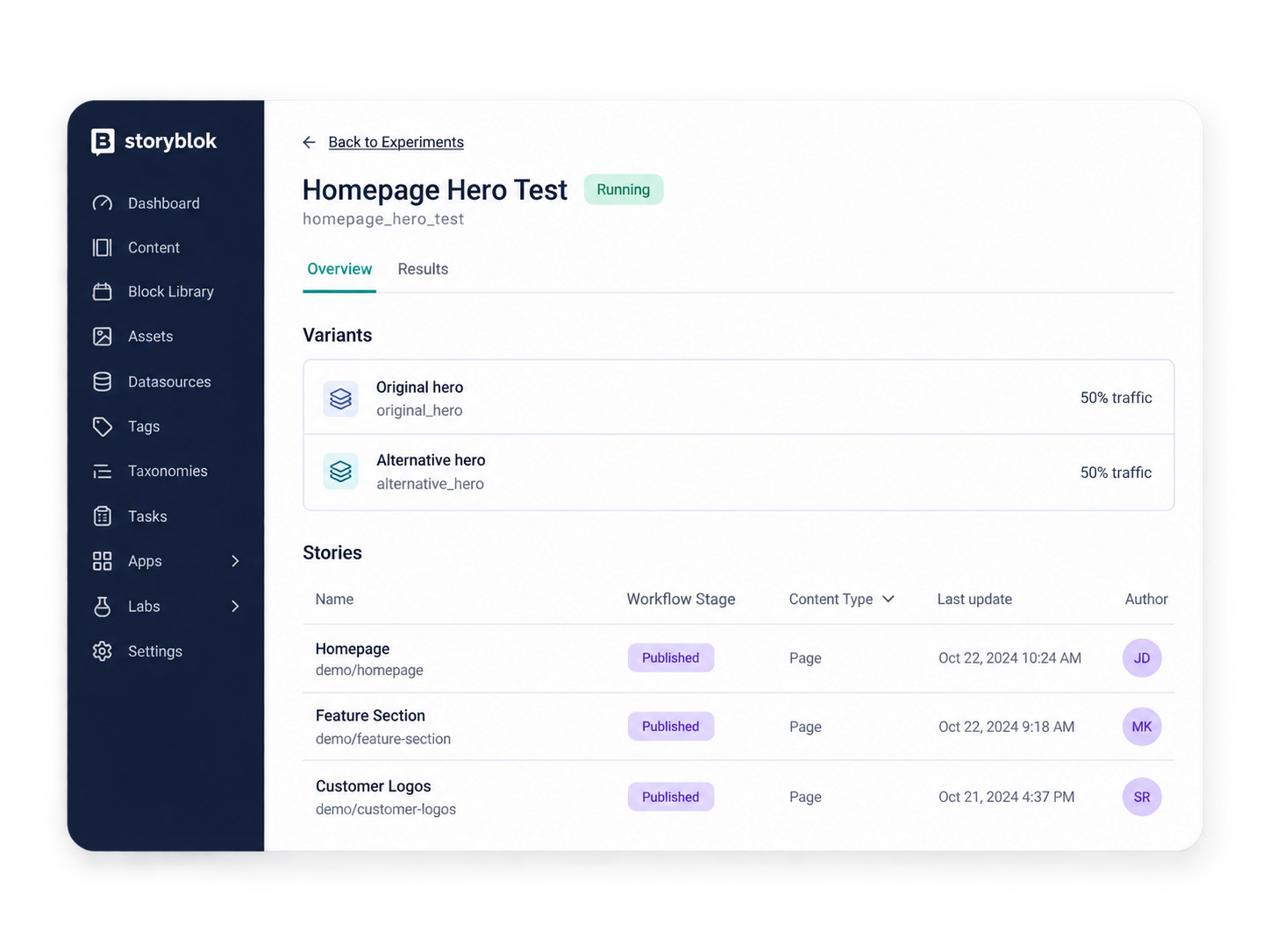 Everything is managed through Storyblok, so editors can use the visual editor they're already familiar with. That's what makes the feature particularly interesting to us. It adds experimentation to a content management process that teams already understand.
Making A/B testing work with Astro
Gravitee's website is built using Astro, and our production pages are prerendered. Rather than generating a page every time somebody visits it, Astro generates the finished HTML when we build the website. Netlify then serves that HTML directly from its CDN.
It's an approach we favour for a lot of our projects. It's fast, efficient and means search engines and AI crawlers can access complete HTML without relying on JavaScript to assemble the page.
But it presents an interesting problem for A/B testing. If two visitors request exactly the same URL, how do we serve them different versions when the page has already been generated?
We could have changed the site to render pages dynamically using Astro for every request. That would have allowed us to select the appropriate Storyblok variant whenever somebody visited a page, but we didn't want to give up the benefits of prerendering just to choose between two versions.
Instead, we decided to keep the pages static and handle the decision at the edge.
Using Netlify Edge Functions
During the build, we retrieve the experiment information from Storyblok. Astro then generates the original page and each alternative version as separate HTML files, meaning they're all ready to serve before anyone visits the website.
We use Netlify Edge Functions to decide which version each visitor should receive. An Edge Function is a small piece of code that runs before Netlify delivers the page. In our case, it:
- Checks whether the requested page is part of an experiment.
- Checks whether the visitor has already been assigned a variant.
- If not, chooses one based on the traffic distribution configured in Storyblok.
- Remembers that assignment using a cookie.
- Serves the appropriate HTML while keeping the visitor on the original URL.
The visitor doesn't have to do anything and won't see a redirect. We also configured the caching carefully to make sure each visitor receives their assigned version, rather than accidentally serving the same cached variant to everyone.
This gives us A/B testing while keeping the benefits of Astro's prerendered pages. The main trade-off is that new or updated variants need to be included in a production deployment before they become available.
For Gravitee, where Astro builds are relatively quick, we felt that was a sensible compromise.
Why we chose this over client-side JavaScript A/B testing
Many traditional A/B testing tools work by loading a page and then using JavaScript in the browser to change its content. That might mean replacing a headline, swapping an image or showing a different call-to-action.
The problem is that visitors can sometimes see the original content before JavaScript has finished making those changes. This is known as the flicker effect, where a page briefly displays one version before switching to another. Some tools prevent this by hiding the page until the experiment is ready, but that can introduce its own performance issues.
Our approach avoids that problem. Netlify decides which variant to serve before the HTML reaches the browser, so visitors receive the correct version from the first render. There's no need to manipulate the page after it loads and no visible switch between variants.
We also avoid loading additional client-side experimentation JavaScript just to decide which content to display. That means less work for the browser and fewer opportunities for the experiment itself to affect the user experience.
Both versions are prerendered, so visitors receive complete HTML whichever variant they're assigned. That's useful for performance, accessibility and ensuring crawlers can access the content without needing JavaScript to render it.
For us, that's one of the biggest benefits of this approach. We can introduce A/B testing without compromising the way we've designed the website to be delivered.
Tracking the results with GA4 and the dataLayer
Serving different versions of a page is only half the job. We also need to understand which version is performing better.
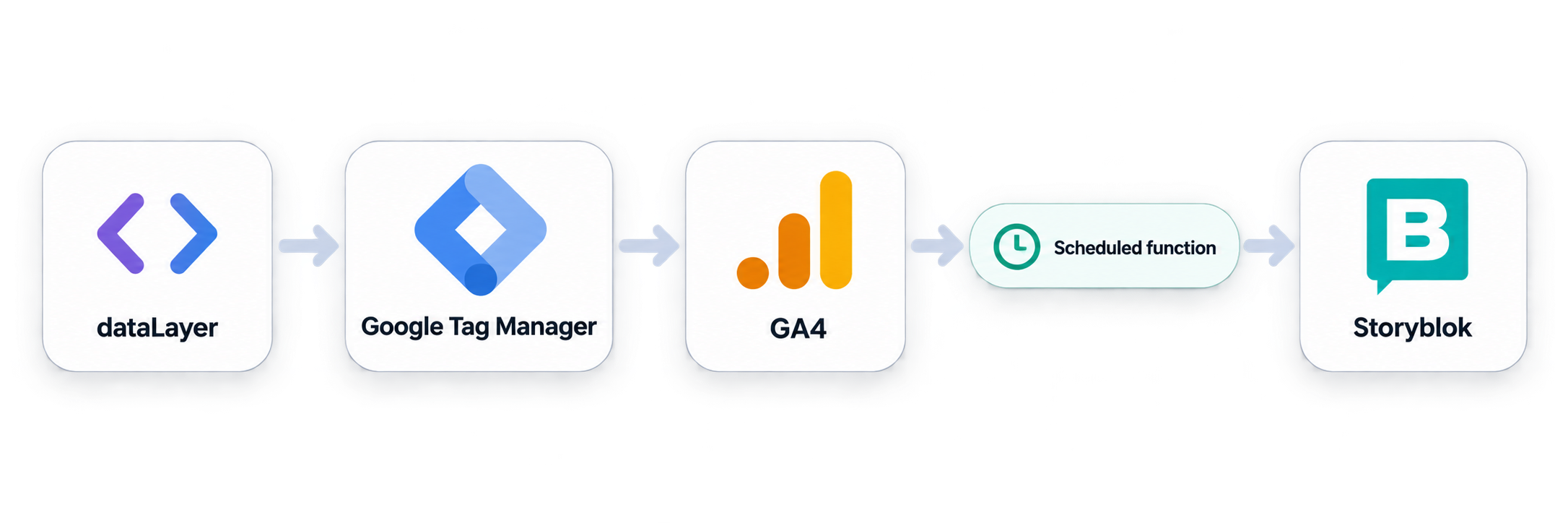
For Gravitee, we wanted to build on the analytics setup already in place, which includes Google Tag Manager (GTM) and Google Analytics 4 (GA4). An important part of how we approach analytics at Anything is making good use of the dataLayer.
If you're not familiar with it, the dataLayer is a structured way for a website to share information with tools such as Google Tag Manager. Rather than GTM having to work everything out by inspecting what's happening on the page, the website can explicitly tell it what's happened and provide useful information alongside it.
For example, we might push information about the current page, a form submission, a button click or a product somebody has selected. GTM can then use that information to send events and details into GA4 or other analytics platforms.
We're always looking at ways to make the dataLayer more useful on the websites we build. The more relevant, consistent information we make available, the more flexibility we have when it comes to tracking and reporting.
For A/B testing, we simply extended the dataLayer with information about the experiments.
Adding experiment information
When a visitor is served an experimental page, we push an event called experience_impression into the dataLayer, along with the experiment ID, experiment name, variant ID and variant name.
This means we can identify which version of a page was served and use that information when analysing results.
We also wanted to measure interactions with calls-to-action. Rather than having developers add custom tracking to individual buttons, we extended Gravitee's existing Storyblok button component with a simple checkbox called Track Experiment Click.
When an editor enables this option, clicking that button pushes an experience_click event into the dataLayer, along with the relevant experiment and variant information. GTM can then send these events into GA4, subject to the site's existing consent management.
This gives editors control over which buttons contribute to experiment tracking without needing a developer every time they run a test.
It's also an approach we can build on. By making experiment information available through the dataLayer, we're improving the overall analytics setup rather than creating a separate tracking system just for A/B testing.
Getting the results back into Storyblok
Storyblok provides a Results section within Experiments, where editors can view how different variants are performing. However, Storyblok doesn't collect the analytics data itself. You need to provide that information from an external source.
For Gravitee, GA4 was the obvious choice. It's already collecting the website's analytics data, and with our experiment events in place, we can report on impressions and tracked button clicks for each variant.
We like this approach because the information remains available in GA4 for wider reporting and analysis. But we also wanted to make the results accessible inside Storyblok. After all, if an editor creates and manages an experiment within the CMS, it makes sense that they should be able to see how it's performing there too.
Our GA4-to-Storyblok integration
We built a scheduled Netlify function that runs twice a day. It retrieves experiment data from GA4 and sends the results back into Storyblok using its Management API.
For each variant, we report three metrics:
- Impressions: How many experiment impression events were recorded.
- CTA clicks: How many tracked button clicks were recorded.
- Click-through rate: CTA clicks divided by impressions, expressed as a percentage.
Storyblok displays this information within the Experiments Results area, including charts comparing the different variants.
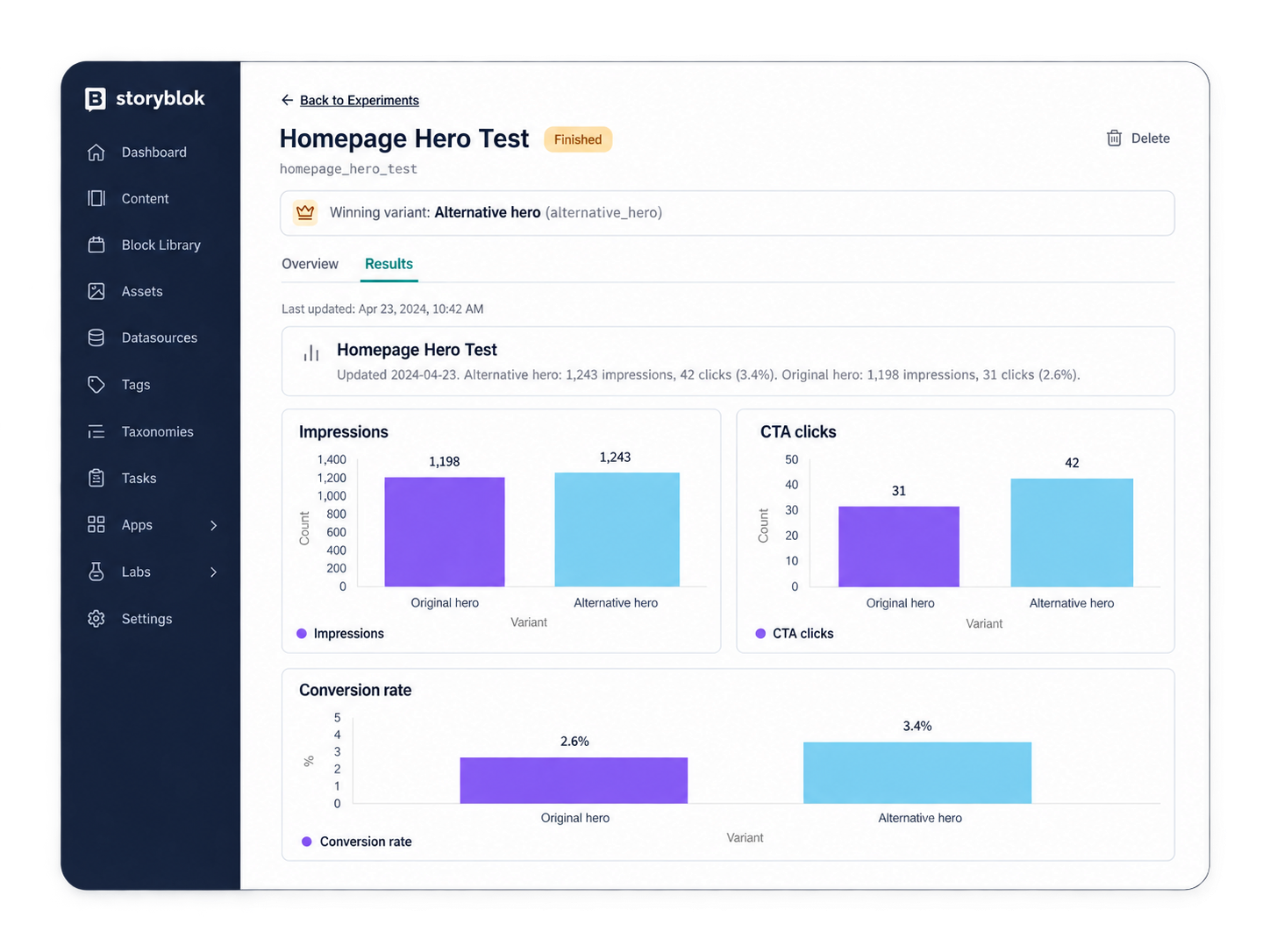 This means editors can create an experiment, make changes to their content and review results without leaving Storyblok. The underlying data remains available in GA4 whenever they need to explore it in more detail.
It's worth clarifying that our click-through rate measures interactions with selected buttons. It doesn't automatically tell us whether somebody completed a form, became a lead or made a purchase. Those outcomes would require their own tracking.
Although we've used Netlify for Gravitee, this approach isn't specific to Netlify. The same result could be achieved using platforms such as Cloudflare, Vercel or AWS Amplify, using their respective edge or serverless capabilities.
The underlying principle is the same: serve the correct Storyblok variant, track its performance through your analytics platform and send the results back into Storyblok. The implementation will differ depending on your hosting setup, but you're not tied to a particular provider.
One thing we'd love to see Storyblok add
Although we like using GA4 to collect and store experiment data, we'd love to see Storyblok offer a native way to handle basic experiment tracking and reporting.
Even if that were just impressions and a configurable conversion event, it could make getting started much easier, particularly for smaller implementations where building a full analytics integration might be difficult to justify.
For now, the flexibility to use an existing analytics platform and bring that data back into Storyblok works well for us. We're not adding another analytics service just to run experiments, and everything fits with how we've already built the Gravitee website.
What does this mean for Gravitee's content team?
Once the integration is in place, running an experiment becomes relatively straightforward.
An editor can create an experiment in Storyblok, select the page they want to test and create an alternative version. They might make a small change, such as testing a different hero headline, or completely rethink the layout and messaging.
They can then configure the traffic distribution, publish their variants and have them included in the next production deployment. If they're testing CTA performance, they can enable tracking on the relevant buttons.
Once the experiment is running, the results are automatically brought back into Storyblok from GA4 twice a day.
The important thing is that the development work happens upfront. There's no need for a developer to write new tracking code or implement variant selection every time somebody wants to test a different headline.
That gives Gravitee's content team a repeatable way to experiment with their website, without changing the technology or processes they already use.
Our thoughts on Storyblok A/B testing
Having implemented Storyblok Experiments for Gravitee, we can see why we were so excited about the feature when we first heard about it at JoyConf 2025.
The flexibility of testing an entire story, rather than being limited to changing individual elements, makes it particularly useful for content teams. And while there is some initial development involved, once variant delivery and analytics are connected, it's a powerful addition to Storyblok.
For Gravitee, we've introduced experimentation while retaining Astro's performance benefits, made better use of the analytics infrastructure already in place and brought results directly into the CMS.
We're looking forward to seeing how Storyblok develops the feature further, particularly around native reporting.
Interested in adding A/B testing to your Storyblok website?
If you're using Storyblok and want to explore what's possible with Experiments, get in touch with Anything. We'd be happy to talk through what's involved.
Frequently asked questions about Storyblok A/B testing
Does Storyblok have built-in A/B testing?
Yes. Storyblok launched native A/B testing on 1 June 2026 through Storyblok Labs. The feature is available on Premium and Elite plans and is currently in beta.
It allows content teams to create experiments, manage alternative versions of pages and configure traffic distribution. Because Storyblok is a headless CMS, developers still need to implement how variants are delivered and how performance is tracked.
Is Storyblok A/B testing a one-click solution?
Not quite. Storyblok provides the tools for managing experiments and content variants, but your website needs to handle visitor assignment, variant delivery and analytics.
The amount of development depends on your existing technology. For Gravitee, we integrated the feature using Astro, Netlify Edge Functions and GA4. Once the integration is complete, editors can manage routine experiments without requiring custom development for every test.
Can you use Storyblok A/B testing with Astro?
Yes. Storyblok Experiments can be integrated with Astro websites, including those using prerendered pages.
For Gravitee, we generate the original page and its variants as static HTML during the build. Netlify Edge Functions then decide which version to deliver to each visitor, allowing us to retain Astro's fast, prerendered page delivery.
Can you A/B test an entire page in Storyblok?
Yes, and it's one of our favourite things about the feature. Storyblok creates alternative versions of a story, so you're not restricted to changing individual page elements.
You could test a single headline, swap an image, change calls-to-action or create a completely different page layout. Editors can make these changes using Storyblok's existing visual editor.
How do you track A/B testing results in GA4 and display them in Storyblok?
You can use Google Tag Manager and the website's dataLayer to send experiment information into GA4.
For Gravitee, we track which variants visitors receive and clicks on selected calls-to-action. A scheduled Netlify function then retrieves results from GA4 twice daily and sends them into Storyblok through its Management API.
Editors can review impressions, CTA clicks and click-through rates directly in Storyblok's Experiments Results section. This reporting connection requires custom integration.
Can you use third-party A/B testing tools with Storyblok?
Yes. Storyblok can also work with dedicated experimentation and personalisation platforms, including:
- VWO: An official Storyblok integration for experimentation, targeting and analytics.
- Croct: Provides block-level A/B testing, personalisation, audience targeting and built-in analytics.
- Optimizely: Offers integration options for associating Storyblok content with targeted experiences.
These platforms may offer more advanced experimentation and personalisation capabilities, although they can involve additional subscriptions and integration work.
Storyblok's native Experiments feature is an attractive alternative if you want to manage testing within your CMS and use analytics tools such as GA4 without introducing another dedicated A/B testing platform.